Lost in the Apple Store: How Ecosystem Jargon Trips Up English Learners During Tech Support

Photo: person on phone call with Apple laptop and iPhone on desk looking confused, via toppng.com
Picture this: your iPhone won't sync with your Mac, so you call Apple Support. The agent is friendly, speaks clearly, and seems totally helpful. But halfway through the call, you realize you've nodded along to three terms you didn't actually understand. What exactly did they mean by "Handoff"? Why did they mention "the ecosystem" like it's a place you can visit? And what on earth is a "Universal Clipboard"?
If this sounds familiar, you're not alone. Apple's product language is a world of its own—and for non-native English speakers, it creates a very specific kind of confusion. It's not just about technical knowledge. It's about the English itself.
Why Apple's Feature Names Feel Like a Different Language
Apple has a habit of naming its features with everyday English words that carry very different meanings in a tech context. Take Handoff, for example. In regular American English, a "handoff" usually means passing something from one person to another—like a relay race, or handing off a project to a coworker. That meaning isn't wrong in tech, either. Handoff literally lets you start a task on your iPhone and pick it up on your Mac. But if you don't already know what the feature does, the name alone won't tell you much.
The same goes for AirDrop. "Air" and "drop" are both simple words. But together? That's a wireless file-sharing feature unique to Apple devices. A learner hearing "just AirDrop it to me" for the first time might picture something being dropped out of an airplane. (Honestly, not the worst mental image.)
Then there's iCloud. The "i" prefix is vintage Apple branding—it started with the iMac back in 1998 and has meant everything from "internet" to "individual" to just... Apple-ness. And "cloud" in tech means remote storage servers, not the fluffy things in the sky. Put them together and you get a storage and syncing service that lives on Apple's servers. Clear enough once you know it—but a real stumbling block if you don't.
The Ecosystem Problem: A Word That Means Everything and Nothing
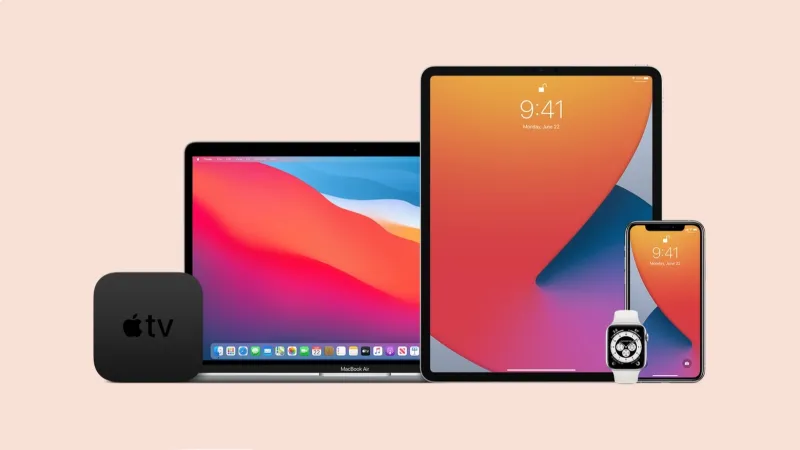
One of the most overused words in Apple support conversations is ecosystem. Technically, an ecosystem is a biological term—the network of living things in a particular environment. Apple borrowed it to describe how all their devices (iPhone, Mac, iPad, Apple Watch, Apple TV) are designed to work together seamlessly.
The problem is that support agents use "ecosystem" as shorthand for a huge range of ideas. "That feature works within the Apple ecosystem" might mean:
- It only works if both devices are Apple products
- It requires an Apple ID to function
- It depends on iCloud being enabled
- All of the above
For learners, the word signals that something is interconnected—but it doesn't tell you how or why. A useful trick: whenever you hear "ecosystem" in a support call, mentally replace it with "Apple's connected world of devices." That reframe usually makes the sentence click.
Real Phrases You'll Hear (And What They Actually Mean)
Let's break down some common support-call sentences and translate them into plain English.
"Make sure Handoff is enabled in your system settings." Translation: Go into your device's settings and turn on the feature that lets you continue tasks between your iPhone and Mac.
"Your Universal Clipboard should let you copy on one device and paste on another." Translation: If you copy text or an image on your iPhone, you can paste it directly on your Mac—no extra steps needed.
"That's an iCloud sync issue—your data isn't pushing to the cloud properly." Translation: Your files or information aren't being saved to Apple's online storage, so changes on one device aren't showing up on another.
"Try AirDropping the file instead of emailing it." Translation: Use Apple's wireless sharing feature to send the file directly from your device to theirs—it's faster than email when you're nearby.
Notice a pattern? Apple's feature names are almost always descriptive metaphors. Once you understand the metaphor, the name makes sense. Handoff = passing a task. AirDrop = dropping a file through the air. Universal Clipboard = one clipboard that works everywhere. Learning to think metaphorically is one of the most useful English skills you can build for navigating tech conversations.
Practical Scripts for Your Next Support Call
Don't let unfamiliar vocabulary leave you guessing. Here are a few phrases you can use to stay in control of the conversation:
When you don't recognize a term:
"I'm not familiar with that feature—could you describe what it does in simple steps?"
When instructions are moving too fast:
"Sorry, could you walk me through that one step at a time? I want to make sure I follow along."
When you want to confirm you understood correctly:
"So just to check—you're saying I should go to Settings, then tap on my name, and make sure iCloud Drive is turned on?"
When you're unsure if a feature applies to your device:
"Does this work on my specific model, or do I need a different Apple device for that?"
These phrases work in any support context—Apple Store, phone support, or online chat. They signal that you're engaged and want clarity, which usually gets you a more helpful, patient response.
The Bigger Picture: Thinking in Apple English
Apple's ecosystem language isn't going away. If anything, features like Continuity Camera, Universal Control, and SharePlay suggest the naming conventions are getting more creative over time. For English learners who use Apple products, building a mental glossary of these terms is genuinely practical—not just for tech support, but for everyday conversations with American colleagues, friends, and classmates who live inside the Apple world.
The good news? Most of these terms follow a logic once you start looking for it. Apple names things after what they feel like, not just what they do. That's actually a very English way of thinking—and learning to see it is a skill that goes well beyond tech support calls.